AI links open with a title + excerpt (these tools can't fetch the page themselves) — use "Copy full article" to paste the complete text for a fuller summary.
In this Blog, we can create a simple windows application connect with the MySQL server to maintain the cheque details and report using visual studio.
Process Flow:
- Create table & store procedure
- Create Application
- Report Generation
Create table & store procedure:
In this application I have used MDF file. if you need, create database from SQL Server, Following the same script.
CREATE TABLE [dbo].[ChequeDetails] ( [ChequeDetailsId] NUMERIC (20) IDENTITY (1, 1) NOT NULL, [ChequeNumber] NVARCHAR (50) NULL, [GivenTo] NVARCHAR (50) NULL, [GivenDate] NVARCHAR (20) NULL, [ValidUpto] NVARCHAR (20) NULL, [Amount] NUMERIC (20, 2) NULL, [Notes] NVARCHAR (MAX) NULL, [CreatedBy] INT NULL, [CreatedDateTime] DATETIME NULL, [ModifiedBy] INT NULL, [ModifiedDateTime] DATETIME NULL, [IsDeleted] BIT NULL, PRIMARY KEY CLUSTERED ([ChequeDetailsId] ASC) );
CREATE TABLE [dbo].[UserMaster] ( [UserId] INT IDENTITY (1, 1) NOT NULL, [UserName] VARCHAR (20) NULL, [Password] NVARCHAR (MAX) NULL, [FirstName] VARCHAR (50) NULL, [LastName] VARCHAR (50) NULL, [Gender] TINYINT NULL, [EmailId] VARCHAR (250) NULL, [PhoneNumber] VARCHAR (10) NULL, [IsActiveUser] BIT NULL, [IsUserDeleted] BIT NULL, PRIMARY KEY CLUSTERED ([UserId] ASC) );
CREATE PROCEDURE Proc_ChequeDetails @Mode varchar(10), @ChequeDetailsId NUMERIC(20)= NULL, @ChequeNumber nvarchar(50) = NULL, @GivenTo nvarchar(50) = NULL, @GivenDate nvarchar(20) = NULL, @ValidUpto nvarchar(20) = NULL, @Notes nvarchar(max) = NULL, @Amount NUMERIC(20,2) = NULL, @UserId int = NULL, @IsDeleted bit = NULL AS BEGIN IF(@Mode='INSERT') BEGIN INSERT INTO dbo.ChequeDetails(ChequeNumber,GivenTo,GivenDate,ValidUpto,Amount,Notes,CreatedBy,CreatedDateTime,ModifiedBy,ModifiedDateTime,IsDeleted) VALUES(@ChequeNumber,@GivenTo,@GivenDate,@ValidUpto,@Amount,@Notes,@UserId,GETDATE(),@UserId,GETDATE(),0)
			SELECT 1 IsSuccess,'Cheque added Successfully!' as OutputMessage

			SELECT ChequeDetailsId,ChequeNumber,GivenTo,GivenDate,ValidUpto,Amount,Notes,CreatedBy,CreatedDateTime,ModifiedBy,ModifiedDateTime FROM dbo.ChequeDetails
		END
	IF(@Mode='UPDATE')
		BEGIN
			UPDATE dbo.ChequeDetails SET ChequeNumber=@ChequeNumber,GivenTo=@GivenTo,GivenDate=@GivenDate,ValidUpto=@ValidUpto,Amount=@Amount,Notes=@Notes,
			ModifiedBy=@UserId,ModifiedDateTime=GETDATE()
			WHERE ChequeDetailsId=@ChequeDetailsId

			SELECT 1 IsSuccess,'Cheque added Successfully!' as OutputMessage

			SELECT ChequeDetailsId,ChequeNumber,GivenTo,GivenDate,ValidUpto,Amount,Notes,CreatedBy,CreatedDateTime,ModifiedBy,ModifiedDateTime FROM dbo.ChequeDetails
		END
	IF(@Mode='DELETE')
		BEGIN
			UPDATE dbo.ChequeDetails SET IsDeleted=@IsDeleted,ModifiedBy=@UserId,ModifiedDateTime=GETDATE()
			WHERE ChequeDetailsId=@ChequeDetailsId

			SELECT 1 IsSuccess,'Cheque added Successfully!' as OutputMessage

			SELECT ChequeDetailsId,ChequeNumber,GivenTo,GivenDate,ValidUpto,Amount,Notes,CreatedBy,CreatedDateTime,ModifiedBy,ModifiedDateTime FROM dbo.ChequeDetails
		END
	IF(@Mode='GETALL')
		BEGIN
			SELECT ChequeDetailsId,ChequeNumber,GivenTo,GivenDate,ValidUpto,Amount,Notes,CreatedBy,CreatedDateTime,ModifiedBy,ModifiedDateTime FROM dbo.ChequeDetails
		END
	IF(@Mode='SEARCH')
		BEGIN
			SELECT ChequeDetailsId,ChequeNumber,GivenTo,GivenDate,ValidUpto,Amount,Notes,CreatedBy,CreatedDateTime,ModifiedBy,ModifiedDateTime,IsDeleted FROM dbo.ChequeDetails
		END
END
CREATE PROCEDURE [dbo].[Proc_Report]
AS BEGIN select cd.ChequeNumber,cd.Amount,cd.GivenTo as ChequeGivenTo, cd.GivenDate as [ChequeGivenDate],cd.ValidUpto as [ChequeValidUpto],DATEDIFF(DAY,CAST(GETDATE() AS DATE), (CASE WHEN TRY_PARSE(ValidUpto AS smalldatetime) IS NULL THEN TRY_PARSE((SUBSTRING(ValidUpto,4,2) + '/' + SUBSTRING(ValidUpto,1,2) + '/' +SUBSTRING(ValidUpto,7,4)) AS smalldatetime) ELSE TRY_PARSE(ValidUpto AS smalldatetime) END)) AS [RemainingDays], cd.Notes,umc.FirstName+' '+umc.LastName as [ChequeCreatedBy],cd.CreatedDateTime as [ChequeCreatedDateTime], umm.FirstName+' '+umm.LastName as [ChequeModifiedBy],cd.ModifiedDateTime as [ChequeModifiedDateTime] from dbo.ChequeDetails cd left join dbo.UserMaster umc on cd.CreatedBy=umc.UserId left join dbo.UserMaster umm on cd.ModifiedBy=umm.UserId order by cd.ModifiedDateTime desc END CREATE PROCEDURE [dbo].[Proc_ValidateUser] @Mode varchar(50), @UserName varchar(20), @Password varchar(max) AS BEGIN IF @Mode='VALIDATEUSER' BEGIN IF EXISTS(SELECT 1 FROM dbo.UserMaster WHERE LOWER(UserName)=LOWER(@UserName) OR PhoneNumber=@UserName) BEGIN IF EXISTS(SELECT 1 FROM dbo.UserMaster WHERE (LOWER(UserName)=LOWER(@UserName) OR PhoneNumber=@UserName) AND ISNULL(IsActiveUser,0)=1) BEGIN IF EXISTS(SELECT 1 FROM dbo.UserMaster WHERE (LOWER(UserName)=LOWER(@UserName) OR PhoneNumber=@UserName) AND Password=@Password COLLATE SQL_Latin1_General_CP1_CS_AS) BEGIN SELECT 'true' AS IsAuthenticated,UserId,'!' AS UserFullName,'Login Successfully!' AS ErrorMessage FROM dbo.UserMaster WHERE (LOWER(UserName)=LOWER(@UserName) OR PhoneNumber=@Username) AND Password=@Password END ELSE BEGIN SELECT 'false' AS IsAuthenticated,0 AS UserId,'Wrong Password!' AS ErrorMessage END END ELSE BEGIN SELECT 'false' AS IsAuthenticated,0 AS UserId,'User Name is not Active!' AS ErrorMessage END END ELSE BEGIN SELECT 'false' AS IsAuthenticated,0 AS UserId,'User Name not Exist!' AS ErrorMessage END END END
Create Application:
Open Visual Studio New > Project > Window Desktop > Select Windows Form Application

After following the project name enter OK button, it will go to solution explorer window. Right Click the project and select New> New Item

I have added the all files like below the structure
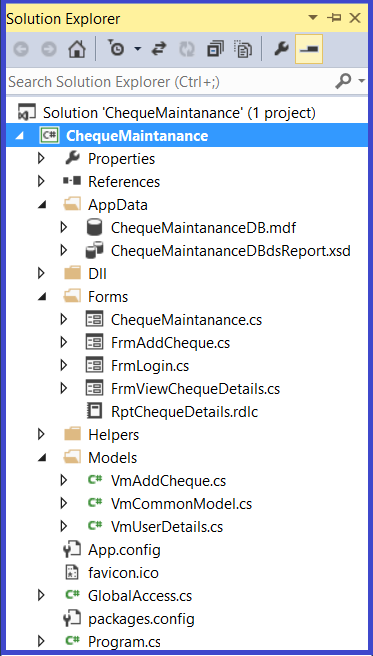
If you going to use MDF, after creating this file run the above query on new query in visual studio.I have authenticated simple username & password
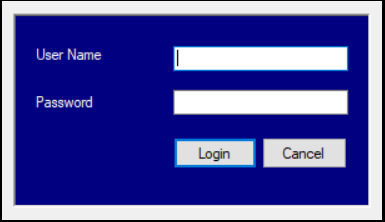
Only after login validation, it allows to the Parent form (MDI Form)
if (TxtUserName.Text == "" || string.IsNullOrEmpty(TxtUserName.Text)) {
LblMessage.Text = "Please Enter User Name";
TxtUserName.Focus();
return;
}
if (TxtPassword.Text == "" || string.IsNullOrEmpty(TxtPassword.Text))
{
LblMessage.Text = "Please Enter Password";
TxtPassword.Focus();
return;
}
try
{
var dsResult = new DataSet();
var vmResult = new VmUserDetails();
SqlParameter[] sqlParam = new SqlParameter[3];
sqlParam[0] = new SqlParameter("@Mode", "VALIDATEUSER");
sqlParam[1] = new SqlParameter("@UserName", TxtUserName.Text);
sqlParam[2] = new SqlParameter("@Password", TxtPassword.Text);
dsResult = objHelper.GetDatasetFromProcedure("dbo.Proc_ValidateUser", sqlParam);
if (dsResult != null && dsResult.Tables.Count > 0)
{
if (dsResult.Tables[0].Rows.Count > 0)
{
vmResult = dsResult.Tables[0].ToList
Cheque Details Getting From:

Data save into the database and pending to data grid control
var objAddCheque = new VmAddCheque(); if (TxtChequeNumber.Text == "" || string.IsNullOrEmpty(TxtChequeNumber.Text)) { LblMessageFaliure.Text = "Please Enter Cheque Number"; TxtChequeNumber.Focus(); return; } if (TxtGivenTo.Text == "" || string.IsNullOrEmpty(TxtGivenTo.Text)) { LblMessageFaliure.Text = "Please Enter the Name of the Person whom you gave this Cheque"; TxtGivenTo.Focus(); return; } if (TxtGivenDate.Text == "" || string.IsNullOrEmpty(TxtGivenDate.Text)) { LblMessageFaliure.Text = "Please Select Cheque Issued date"; TxtGivenDate.Focus(); return; } if (TxtValidUpto.Text == "" || string.IsNullOrEmpty(TxtValidUpto.Text)) { LblMessageFaliure.Text = "Please Select Cheque Expiry date"; TxtValidUpto.Focus(); return; } if (TxtAmount.Text == "" || string.IsNullOrEmpty(TxtAmount.Text)) { LblMessageFaliure.Text = "Please Fill the Cheque Amount"; TxtAmount.Focus(); return; } objAddCheque.Mode = "INSERT"; objAddCheque.ChequeNumber = TxtChequeNumber.Text; objAddCheque.GivenTo = TxtGivenTo.Text; objAddCheque.GivenDate = TxtGivenDate.Text; objAddCheque.ValidUpto = TxtValidUpto.Text; objAddCheque.Amount = Convert.ToDecimal(TxtAmount.Text); objAddCheque.Notes = RtfNotes.Text; SaveDatas(objAddCheque);
Report Generation:
For the report concept I have used default visual studio report of rdlc. If you need, you can add any external reporting tool like crystal report, Telerik report…etc

this.procReportBindingSource.DataMember = "Proc_Report"; this.procReportBindingSource.DataSource = this.chequeMaintananceDBdsReportBindingSource; // // chequeMaintananceDBdsReportBindingSource // this.chequeMaintananceDBdsReportBindingSource.DataSource = this.chequeMaintananceDBdsReport; this.chequeMaintananceDBdsReportBindingSource.Position = 0; // // chequeMaintananceDBdsReport // this.chequeMaintananceDBdsReport.DataSetName = "ChequeMaintananceDBdsReport"; this.chequeMaintananceDBdsReport.SchemaSerializationMode = System.Data.SchemaSerializationMode.IncludeSchema; // // PnlReport // this.PnlReport.BackColor = System.Drawing.Color.SeaShell; this.PnlReport.BorderStyle = System.Windows.Forms.BorderStyle.FixedSingle; this.PnlReport.Controls.Add(this.RptChequeDetails); this.PnlReport.Location = new System.Drawing.Point(13, 12); this.PnlReport.Name = "PnlReport"; this.PnlReport.Size = new System.Drawing.Size(1457, 711); this.PnlReport.TabIndex = 1;
Comments
Be the first to comment.