AI links open with a title + excerpt (these tools can't fetch the page themselves) — use "Copy full article" to paste the complete text for a fuller summary.
Introduction
In this article, we will learn MVC, using Angular Pie Chart, which is used for two types of UI, which are given below.
- Angular Knob Pie Chart.
- Angular Easy Pie Chart.
Angular Knob
Output 1 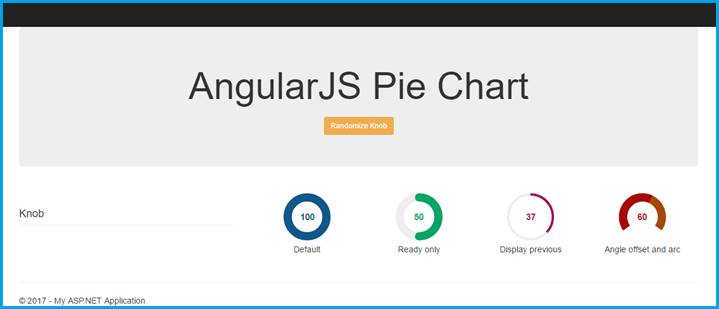
Create MVC Project
Open Visual Studio 2015.  Go to New menu > click New and then project. Now, it will open New Project Window.
 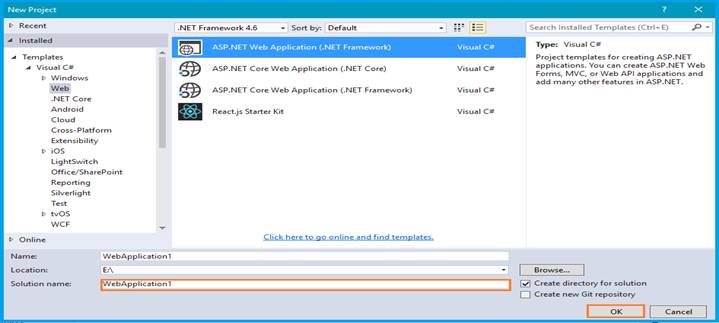 You can select ASP.NET Web Application on Framework 4.6. Enter the name of the project in the Solution name text box, then click the OK button.
 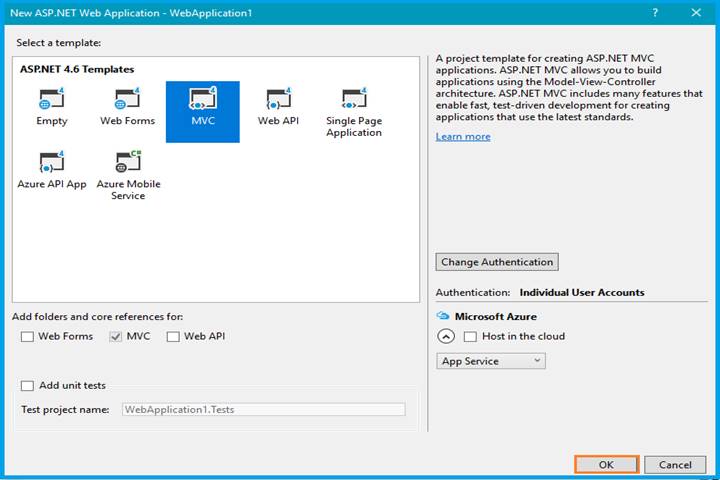 One more Window should appear. Select the MVC template in this popup and click the OK button. Now, you can start to play.
Configure Angular Knob
We will download Angular Knob plugin from here.
Features
- It works based on canvas.
- You can implement keyboard events.
- You can change UI touches, as well as mouse and mouse wheel events.
- Overloads an input element.
Open the _Layout.cshtml and refer the min.js file in this view page.
Comments
Be the first to comment.