AI links open with a title + excerpt (these tools can't fetch the page themselves) — use "Copy full article" to paste the complete text for a fuller summary.
Introduction
This article demonstrates how to use Angular PDF File Viewer in Visual Studio 2017.
Angular PDF File Viewer
Angular Portable Document Format (PDF) File Viewer is built with HTML 5 and supported by Mozilla Labs. It is a web standard based platform for parsing and rendering PDFs.
Features
The delegate service injects this Controller, so you can fetch an instance using its delegate handle and call methods. The following methods are available to the delegate.
- Prev
- Next
- Zoom In
- Zoom Out
- Zoom To
- Rotate
- Page Count
- Go to Page
- Load
Following the below steps, you can use Angular File Upload in AngularJS in MVC.
- Create an MVC Project.
- Configure an Angular PDF File Viewer.
- Work in Angular PDF File Viewer.
Create MVC Project
Open Visual Studio 2017.  Go to New >> New project. Now it will open the "New Project" window.
 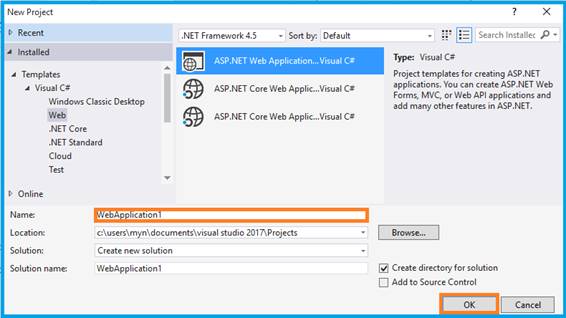 You can select ASP.NET Web Application on Framework 4.5. Enter the name of the project in the “Solution name” text box and click OK.
 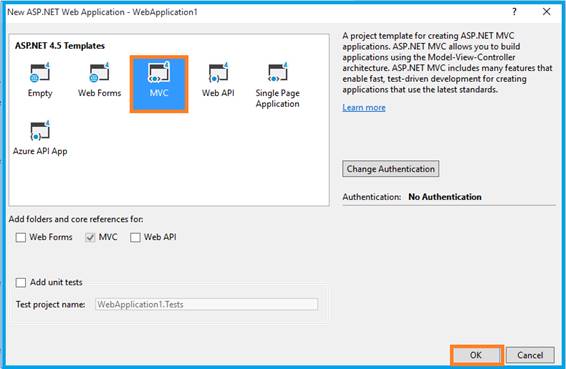 One more window should appear. Select MVC Template in this pop-up and click OK. Now, start cropping the image.
Configure Angular PDF File Viewer
You can download the plug-in from.
Open the _Layout.cshtml; it must refer the .js file from the downloaded folder to this view page.
Comments
Be the first to comment.