AI links open with a title + excerpt (these tools can't fetch the page themselves) — use "Copy full article" to paste the complete text for a fuller summary.
Introduction
In this article, we will learn how to use MVC, using Angular's data binding functionality to create a datatable from the server side with the stored procedures.
Why Use Angular Datatable?
Datatable is great for loading a large amount of data. The table is designed to be extremely flexible and lightweight. Some main features are given below:
- Column Reordering.
- Column Resizing.
- Handle Large Data.
- Client Side and Server Side Pagination/Sorting.
- Fixed and Fluid Height.
In this article, we are going to:
- Create a database.
- Create a stored procedure.
- Create an MVC Application.
- Use Angular Datatable.
Create a Database
Open SQL Server 2016. Click New Query Window and run the query given below.
USE [master] GO /****** Object: Database [test] Script Date: 5/7/2017 8:09:18 AM ******/ CREATE DATABASE [test] CONTAINMENT = NONE ON PRIMARY ( NAME = N'test', FILENAME = N'C:\Program Files\Microsoft SQL Server\MSSQL13.MSSQLSERVER\MSSQL\DATA\test.mdf' , SIZE = 8192KB , MAXSIZE = UNLIMITED, FILEGROWTH = 65536KB ), FILEGROUP [DocFiles] CONTAINS FILESTREAM DEFAULT ( NAME = N'FileStream', FILENAME = N'C:\Program Files\Microsoft SQL Server\MSSQL13.MSSQLSERVER\MSSQL\DATA\FileStream' , MAXSIZE = UNLIMITED) LOG ON ( NAME = N'test_log', FILENAME = N'C:\Program Files\Microsoft SQL Server\MSSQL13.MSSQLSERVER\MSSQL\DATA\test_log.ldf' , SIZE = 8192KB , MAXSIZE = 2048GB , FILEGROWTH = 65536KB ) GO ALTER DATABASE [test] SET COMPATIBILITY_LEVEL = 130 GO IF (1 = FULLTEXTSERVICEPROPERTY('IsFullTextInstalled')) begin EXEC [test].[dbo].[sp_fulltext_database] @action = 'enable' end GO ALTER DATABASE [test] SET ANSI_NULL_DEFAULT OFF GO ALTER DATABASE [test] SET ANSI_NULLS OFF GO ALTER DATABASE [test] SET ANSI_PADDING OFF GO ALTER DATABASE [test] SET ANSI_WARNINGS OFF GO ALTER DATABASE [test] SET ARITHABORT OFF GO ALTER DATABASE [test] SET AUTO_CLOSE OFF GO ALTER DATABASE [test] SET AUTO_SHRINK OFF GO ALTER DATABASE [test] SET AUTO_UPDATE_STATISTICS ON GO ALTER DATABASE [test] SET CURSOR_CLOSE_ON_COMMIT OFF GO ALTER DATABASE [test] SET CURSOR_DEFAULT GLOBAL GO ALTER DATABASE [test] SET CONCAT_NULL_YIELDS_NULL OFF GO ALTER DATABASE [test] SET NUMERIC_ROUNDABORT OFF GO ALTER DATABASE [test] SET QUOTED_IDENTIFIER OFF GO ALTER DATABASE [test] SET RECURSIVE_TRIGGERS OFF GO ALTER DATABASE [test] SET DISABLE_BROKER GO ALTER DATABASE [test] SET AUTO_UPDATE_STATISTICS_ASYNC OFF GO ALTER DATABASE [test] SET DATE_CORRELATION_OPTIMIZATION OFF GO ALTER DATABASE [test] SET TRUSTWORTHY OFF GO ALTER DATABASE [test] SET ALLOW_SNAPSHOT_ISOLATION OFF GO ALTER DATABASE [test] SET PARAMETERIZATION SIMPLE GO ALTER DATABASE [test] SET READ_COMMITTED_SNAPSHOT OFF GO ALTER DATABASE [test] SET HONOR_BROKER_PRIORITY OFF GO ALTER DATABASE [test] SET RECOVERY FULL GO ALTER DATABASE [test] SET MULTI_USER GO ALTER DATABASE [test] SET PAGE_VERIFY CHECKSUM GO ALTER DATABASE [test] SET DB_CHAINING OFF GO ALTER DATABASE [test] SET FILESTREAM( NON_TRANSACTED_ACCESS = FULL, DIRECTORY_NAME = N'DocFileDirctory' ) GO ALTER DATABASE [test] SET TARGET_RECOVERY_TIME = 60 SECONDS GO ALTER DATABASE [test] SET DELAYED_DURABILITY = DISABLED GO EXEC sys.sp_db_vardecimal_storage_format N'test', N'ON' GO ALTER DATABASE [test] SET QUERY_STORE = OFF GO Create a Table I will create a new table, with the information given below:
CREATE TABLE [dbo].[BookMaster]( [BookCode] [varchar](10) NULL, [BookName] [varchar](50) NULL, [BookDesc] [varchar](500) NULL, [BookAuthor] [varchar](50) NULL ) ON [PRIMARY] GO
After creating the table, add some data, as shown below: 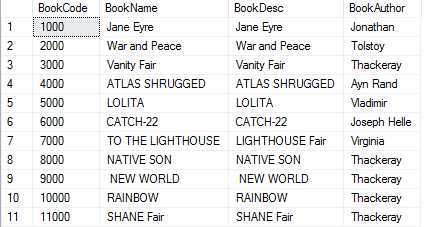
Create a Stored Procedure
I have written the stored procedure for my data operations, so run SP as given below. In this procedure, I have created Done Select, Insert, Update, and Delete functionalities.
Create PROCEDURE [dbo].[BookMaster_SP] @BookCode VARCHAR(10)=NULL, @BookName VARCHAR(50)=NULL, @BookDesc VARCHAR(500)=NUL, @BookAutor VARCHAR(500)=NULL, @Mode VARCHAR(50) AS BEGIN SET NOCOUNT ON; IF (@Mode='ADD') BEGIN INSERT INTO BookMaster(BookCode,BookName,BookDesc,BookAuthor) VALUES(@BookCode,@BookName,@BookDesc,@BookAutor) END IF (@Mode='EDIT') BEGIN UPDATE BookMaster SET BookName=@BookName,BookDesc=@BookDesc,BookAuthor=@BookAutor WHERE BookCode=@BookCode END IF (@Mode='DELETE') BEGIN DELETE FROM BookMaster WHERE BookCode=@BookCode END IF (@Mode='GET') BEGIN SELECT BookCode,BookName,BookDesc,BookAuthor FROM BookMaster END IF (@Mode='GETID') BEGIN SELECT BookCode,BookName,BookDesc,BookAuthor FROM BookMaster WHERE BookCode=@BookCode END SET NOCOUNT OFF; END
Create an MVC Application
Open Visual Studio 2015, go to Menu New->New project ->select Visual C# under templates-> Choose ASP.NET Web Application. 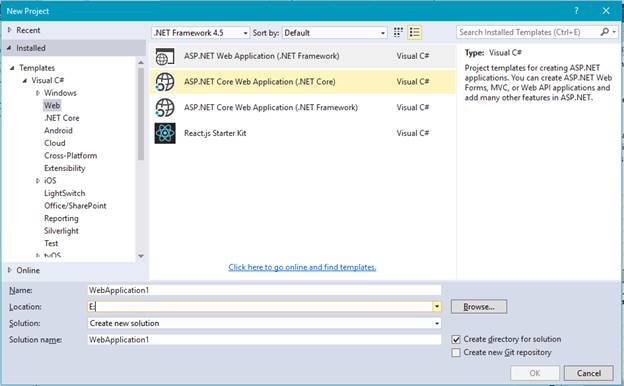 Once you click the OK button, one more Window opens. Select MVC.
 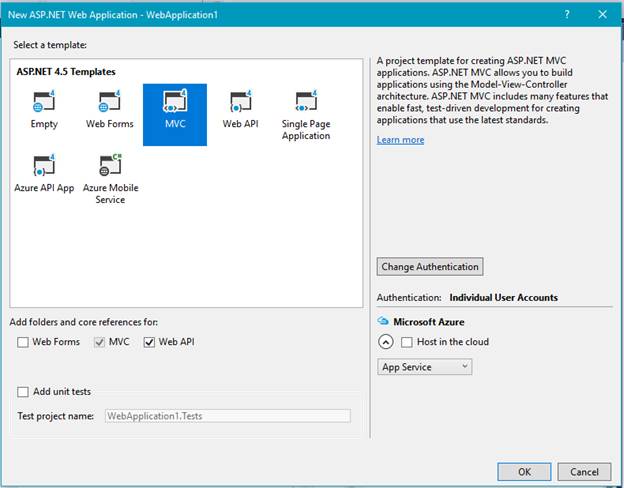 After creating the project, click the link given below and download the plugin files.
Subsequently, inject the datatable keyword in the Angular module. angular.module('uiroute',['ui.router', 'datatables']); Create and design an HTML page with the table. Mention datatable=ng. Now, bind the Server data.
| Book Code | Book Name | Book Description | Book Author Name | ||
| {{ model.BookCode }} | {{ model.BookName }} | {{ model.BookDesc }} | {{ model.BookAuthor }} |
Using Angular Datatable
Create a Model folder in Solution Explorer and create a new class in the Model folder.
public class BookModel { public string BookCode { get; set; } public string BookName { get; set; } public string BookDesc{ get; set; } public string BookAuthor { get; set; } public string Mode { get; set; } }
Write the method given below in your home controller. LoadData displays the data in the Datatable, and another one is using data manipulation.
[HttpPost]
#region LoadData
public JsonResult LoadData(BookModel Param)
{
List
Declare the connection string in your Web.config file.
<connectionStrings> <add name="DbSqlCon" connectionString="Data Source=xxxx; Initial Catalog=test; User I </connectionStrings>
Create an Angular Controller and Service to get the data from the Server side.
Controller
$scope.LoadById = function (model) { $scope.Ed = model; $scope.Datamode = 'Update'; $scope.Enable = true; }
$scope.Save = function ()
{
    if ($scope.Datamode === 'Update')
    {
        var Param = {
            Mode: 'EDIT',
            BookCode: $scope.Ed.BookCode,
            BookName: $scope.Ed.BookName,
            BookDesc: $scope.Ed.BookDesc,
            BookAuthor: $scope.Ed.BookAuthor
        }
    }

    else
    {
        var Param = {
            Mode: 'ADD',
            BookCode: $scope.Ed.BookCode,
            BookName: $scope.Ed.BookName,
            BookDesc: $scope.Ed.BookDesc,
            BookAuthor: $scope.Ed.BookAuthor
        }
    }
    var ServiceData = BookService.EditData(Param);
    ServiceData.then(function (result) {
        $scope.loadTable()
        $scope.Ed = '';
        $scope.message = "Data Save Successfully";
    }, function () {

    });
}

$scope.DaleteById = function (model) {
    var Param = {
        Mode: 'DELETE',
        BookCode: model.BookCode,
    }
    var ServiceData = BookService.EditData(Param);
    ServiceData.then(function (result) {
        $scope.loadTable()
        $scope.Ed = '';
        $scope.message = "Data Delete Successfully";
    }, function () {

    });
Service
this.loadGrid = function (Param) { var response = $http({ method: "post", url: "Home/LoadData", data: JSON.stringify(Param), dataType: "json" }); return response; }
this.EditData = function (Param) {
    var response = $http({
        method: "post",
        url: "Home/EditData",
        data: JSON.stringify(Param),
        dataType: "json"
    });
    return response;
}
Do not forget to refer the plugin files and JS file also.
Plugin
My Files
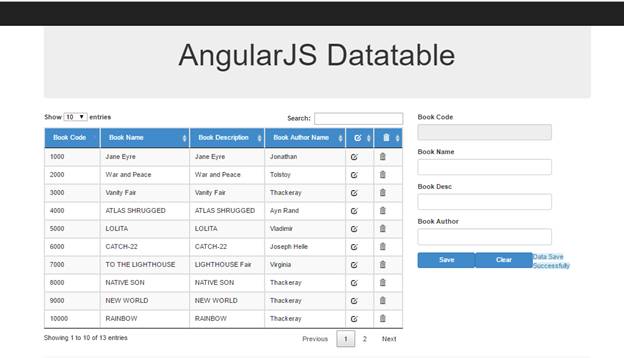
Once you are done with the process given above, your datatable is ready to load. Thus, run the application.
Output
Conclusion
In this article, we have learned some MVC, using Angular Datatable. If you have any queries, please tell me through the comments section**.** Happy Coding!
Comments
Be the first to comment.